









































 Defense
 Vigilance
 Seer
Seer






 How to Craft
 Choose a Crew Skill
 Armormech
 Armstech
 Artifice
 Biochem
 Cybertech
 Synthweaving
 How to Craft Fast
 Gathering Guide
 Rare Materials Guide
 White Materials Guide
 Jawa Junk
 Augments
 Medpacs, Stims and Adrenals
 Synthweaving Crafting Tree




 Crafted Decorations
 Crafted Mounts
 Crafted Dyes
 Crafted Crystals
 Events Calendar
 PvP Seasons
 Bounty Event
 Double XP Event
 Feast of Prosperity
 Gree Event
 Life Day
 Nightlife Event
 Pirate Incursion Event
 Rakghoul Event
 Spring Abundance Festival
 Swoop Event
 Accessibility HubAll Accessibility guides and info
 One-HandedPlaying with one hand or limited mobility
 DeafPlaying while deaf or hearing-impaired
 BlindPlaying while visually impaired or with low vision
 ColorblindPlaying with colorblindness and settings options
 AnxietyPlaying with general anxiety or social anxiety

 Jedi Knight
 Jedi Consular
 Trooper
 Smuggler
 Sith Warrior
 Sith Inquisitor
 Bounty Hunter
 Imperial Agent
 Bounty Hunter
 Imperial Agent
 Jedi
Jedi Jedi Consular
 Jedi Knight
 Sith
Sith Sith Inquisitor
 Sith Warrior
 Smuggler
 Trooper
 Legacy Gear
 Lightsabers
 Double-Bladed Lightsabers
 Vibroswords
 Double-Bladed Vibroswords
 Blaster Pistols
 Blaster Rifles
 Sniper Rifles
 Blaster Cannons


Max and Sema of the SWTOR Escape Podcast cover the crafting materials and methods available on the PTS for Stronghold decorations, start to finish.
Author Archives: Swtorista
-
Wall Small
 No GTN
- Decorations Source Crafting Universal Prefabs Universal Prefab MK-4
-
 x1 Universal Prefab MK-4 Narrow Medium Large Centerpiece Hook
  GTN Yes
- Decorations Source Cartel Market Cartel Market Bundles Exotic Creatures Personnel Bundle
- Decorations Source Cartel Market Cartel Packs Ultimate Cartel Pack Small Narrow Medium
- GTN Yes
-
Centerpiece Hook
- No GTN
- Decorations Source Operation Centerpiece Hook
- GTN Yes
-
Small Medium
- No GTN
- Decorations Source Operation Large
- GTN Yes
-
Small Narrow Medium
- No GTN
Stronghold Crafting Covered by SWTOR Escape Podcast
 Have a suggestion or correction? Go to the Swtorista Website Discord and post your report in the #decorations channel. You will need to make a free Discord account.

Stronghold Decoration Art Released at SWTOR Los Angeles Community Cantina Thumbdrive
Thirteen images of upcoming stronghold decorations have been released through the thumbdrive given away during the Los Angeles Community Cantina. From the Firebrand tank to the Ancient Voss Sarcophogus, we still don’t know how we’ll be able to get these decorations… but at least we can see them.
Have a suggestion or correction? Go to the Swtorista Website Discord and post your report in the #decorations channel. You will need to make a free Discord account.
Stronghold Decoration player suggestions request on Devtracker from Matthew Dondelinger
Associate Designer Matthew Dondelinger has requested player suggestions for ingame decorations for strongholds. Requests like this have happened in the past – only time will show if any of these suggestions are taken to heart! Suggestions range from the absurd to practical.
Have a suggestion or correction? Go to the Swtorista Website Discord and post your report in the #decorations channel. You will need to make a free Discord account.
Stronghold Prestige Guide
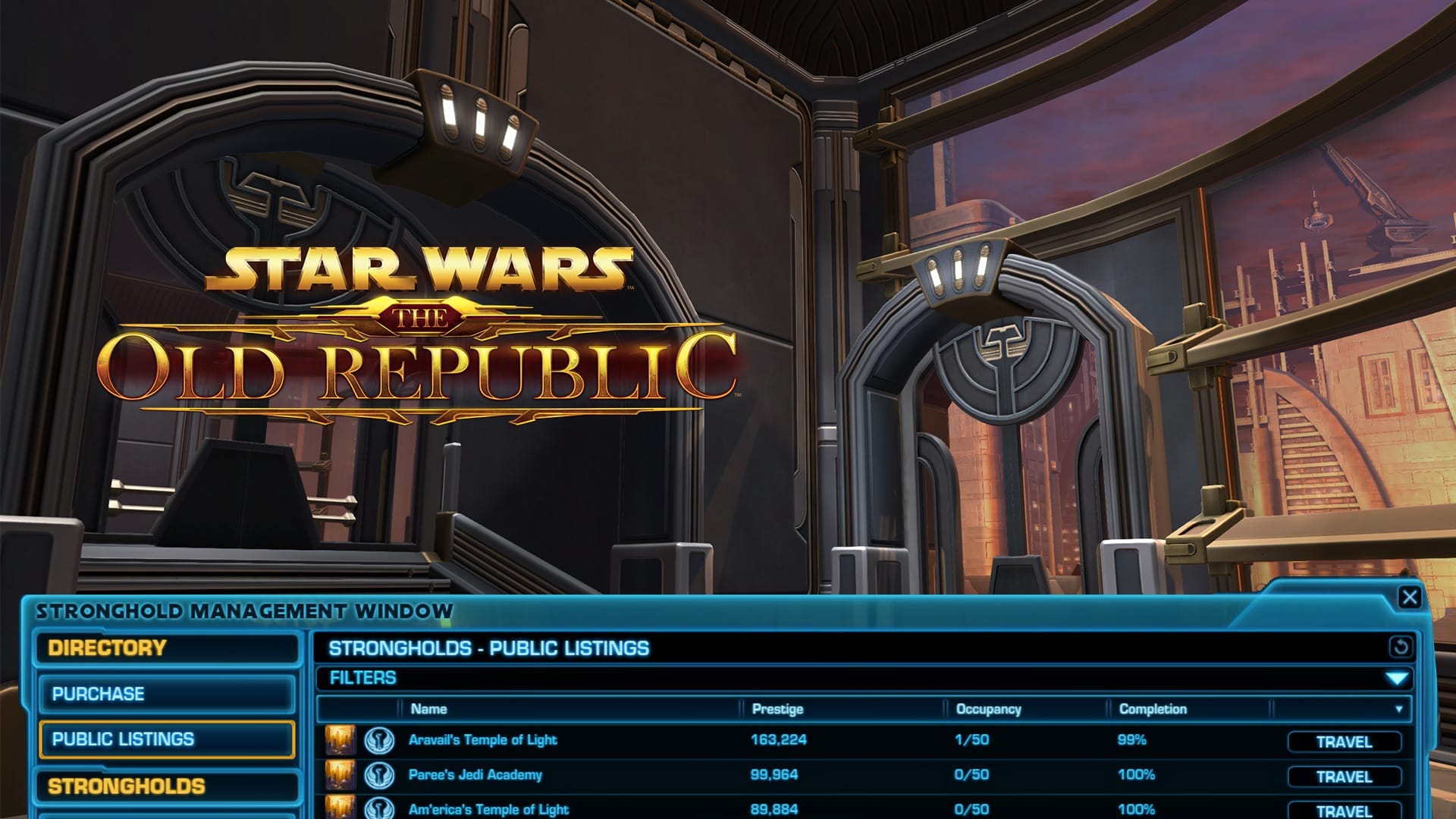
Prestige is a score that is made up of multiple things related to strongholds and decorations. Strongholds with higher prestige are listed higher on the public strongholds listing if you choose to list your stronghold there. For example, my stronghold with a 1,000 prestige will be listed a lot lower than someone who has unlocked a ton of decorations.

How does Prestige work?
There are two types of stronghold-related Prestige.
Legacy Stronghold Prestige – Legacy prestige is made up of how many decorations you have unlocked. Every unique decoration you unlock will increase your Legacy’s Prestige by 100, and subsequent unlocks of the same decoration will increase your Prestige by 2.
To see your legacy stronghold prestige, open the Stronghold Panel. It will be beside a ‘medal’ symbol under the world ‘Personal’ on the left sidebar.

Individual Stronghold Prestige – Each of your Strongholds is scored by multiplying its completion percentage by your Legacy’s Prestige score. You can increase your Stronghold’s completion percentage by unlocking rooms and placing decorations.

In theory, strongholds that top the Public Listing will therefore be the ones that are the most ‘complete’ percentage-wise that are owned by players who have the largest variety of decorations collected and large numbers of the easy-to-get decorations. Collectors often use this score to compete and compare their decoration collections.
Legacy Math Example: If you have collected four different decorations and only have one copy of each, you will have a Legacy Stronghold Prestige of 400 points (100 for each unique decoration). If you had 8 decorations collected, but five of them are the same chair, you would have 408 Legacy Stronghold Prestige Points (100 for each of your four unique decorations, plus 2 points for each of those duplicate four chairs).
Individual Stronghold Math Example: If you have 400 Legacy Stronghold Prestige Points, and your stronghold is 50% decorated, it would be listed as having 200 individual stronghold prestige points (400 x 50% = 200).
Note: There is also a score that is colloquially called ‘prestige’ that involves legacy achievement points. This is completely separate and unrelated to strongholds.
Easy-to-Get Decorations
Each unique decoration is worth 100 points.
 Crafted Easy-to-Get Decorations in SWTOR
 Easy-to-Get Decorations in SWTOR
 Even More Easy-to-Get Decorations in SWTOR
 Stronghold Prestige Guide
Credits Decorations
Buy a stack of as many as you are allowed to own of each deco, as many as you can afford. Each unique is worth 100 points, each duplicate is worth and additional 2 points each, and some stack up to 999.
- Anniversary Vendor (during the event)
- Decoration Merchant
- Legacy Credits Vendor
- Odessan Black Market Decoration Vendor
- PvP Credits Vendor
- Datacron Decos on GTN
- GTN (only items with the Cartel Markey symbol recommended that you can afford)

Crafted Decorations
Craft one of each of these – either yourself or have a friend help. If you plan on buying them, buy the prefabs/war supplies/dark projects rather than the finished decorations.
Easy Decorations
- Intro Quest (you can complete this on as many characters who are level 15+ on the Fleet! you can get lots of copies for free)
- Flashpoint Achievement Trophies (run each Flashpoint in each mode once on veteran mode for the achievements, and master mode if you can)
- Flashpoint Guaranteed Drops (run certain Flashpoints in solo mode for a guaranteed repeatable decoration)
- A Traitor Among the Chiss Flashpoint (drops decorations very frequently even in solo mode)
- Star Fortress Drops (drops decorations very frequently even in the normal mode)
- Star Fortress Achievements (get 999 copies of four decos from the ‘All for One’ achievement)
- Copero Propoganda (get 999 copies of a poster deco from an Achievement in A Traitor Among the Chiss)
- Potted Plant: Blooming Bud (get 999 copies of the planet from a Ziost story achievement)
- Tall Fruit Plant (get 999 copies from the Dantooine Culinarian achievement during the Pirate Incursion event)
- A Killik Home of My Own, three decos from the alderaan Stronghold
- Art: Nerfs achievement, exploration
- Collapsed Dantooine Well achievement, jump in the well
- Security Key
- Lightsaber Forge (Jedi) (Light I from vendor), Lightsaber Forge (Sith) (Dark I from vendor)
Harder-Work Decorations
- Flashpoint Decorations (many can also be found on the GTN if you have more credits than time)
- Reputation, Planets and Events (most of these can only be “earned” not bought)
- Uprisings
- Galactic Seasons Tokens
- PvP Seasons Tokens
- Fleet Commendations
- Cartel Market Certificates
- Class Achievements
- Date Night Achievements
Have a suggestion or correction? Go to the Swtorista Website Discord and post your report in the #decorations channel. You will need to make a free Discord account.

Stronghold Starter Guide
Ready to get started on your first stronghold? Strongholds are Star Wars: The Old Republic’s version of player housing – you can buy a house, and then decorate it the way you’d like with decorations found all over the game. You can then invite others to see your stronghold, or place it on the public listings so people can find it and tour your house. Strongholds are also a very convenient because you can set up useful tools like your legacy bank and a GTN in whatever arrangement you want.
How to Get Your First Stronghold
To purchase your first stronghold, you must be able to reach the Republic or Imperial Fleet – so you can get your first stronghold after you finish your first quest.
There is also a great introductory quest to strongholds that I highly recommend doing which becomes available at Level 15 or higher, which will give you some free decorations. To start the quest, head to the Strongholds & Crew Skills section of the Fleet and look for the holographic questgiver.

After you have accepted the quest from the strongholds hologram questgiver, turn around and walk over to the Stronghold terminals. This is where you can purchase and unlock your first stronghold.

The least expensive Imperial stronghold is the Dromund Kaas stronghold, which costs 5,000 credits.

The least expensive Republic stronghold is the Coruscant stronghold, which costs 5,000 credits.

You can have more than one stronghold, so most players start with one of those two!
To purchase a stronghold, right-click the directory terminal, then choose “Purchase” from the menu on the left, as by default, it shows you the Public Listings tab, which you can use to travel to and visit other people’s strongholds. Once you are on the Purchase tab, you can click the Purchase button if you have enough credits.

The next step of the quest is to go to your stronghold.
How to Use the Strongholds Panel
Once you have purchased your first stronghold, you can use the strongholds panel to travel to it. To open the Stronghold panel, hover over the icon of a triangle in the main menu, and choose “Strongholds”, or you can use the default shortcut by pressing the “U” key on your keyboard.

On the left, you can switch between Personal and Guild strongholds. If you are in a guild, they may also have a stronghold or flagship you can visit!
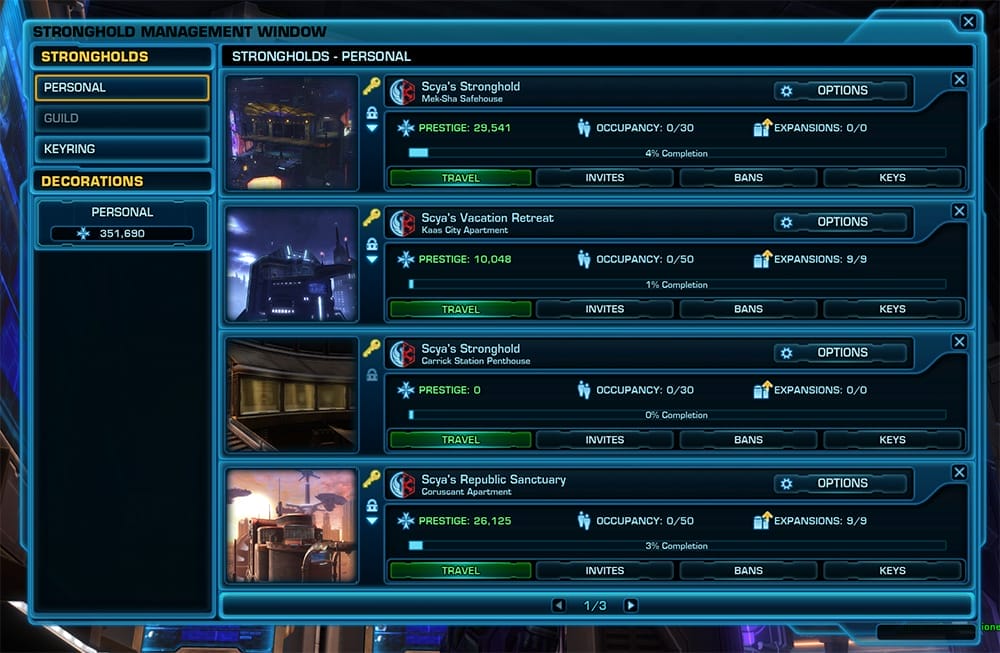
To go to your stronghold once you have purchased it, click the “Travel” button in the strongholds panel, and you’ll be teleported to your stronghold.
To complete the quest, take a few steps forward, and you’ll receive a handful of free basic decorations. You can do this quest on every one of your characters for more free decorations for your stronghold!

Your strongholds and decorations are legacy-wide, and all your characters on your server can visit and decorate your strongholds.

Leaving Your Stronghold
When you are ready to leave your stronghold, press the “Exit Area” button or the elevator button.
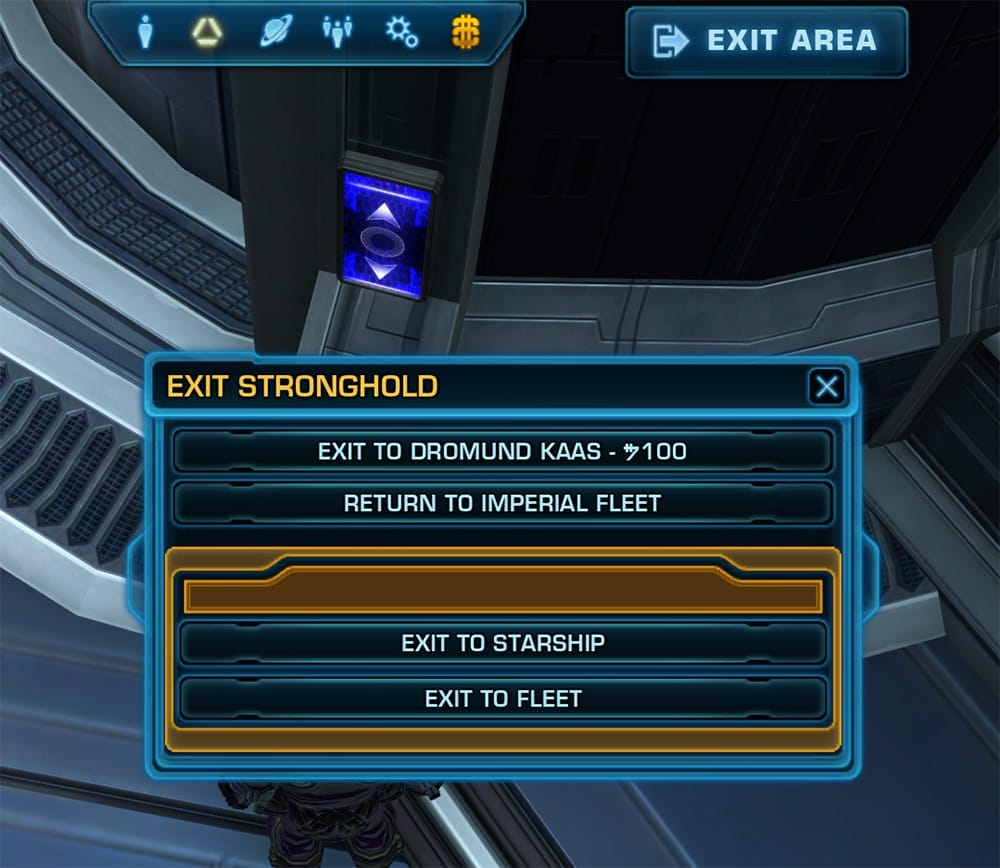
The most common exit point is the “Return” option which allows you to travel back to your original location – so if you are questing, you can make a quick run to your bank, your mailbox or the GTN in your stronghold then travel back to exactly where you were. However the “Return” option will only bring you back to the correct planet (NOT the correct location) if you log out in between. You can also exit to the planet the stronghold is located on, and subscribers can exit to the Fleet or to their Starship.
How to Unlock Decorations
If you have completed the initial stronghold quest, the first time you travel to your stronghold you should receive a bundle of starter decorations. To make them useable in you stronghold, you need to right-click those items in your inventory.
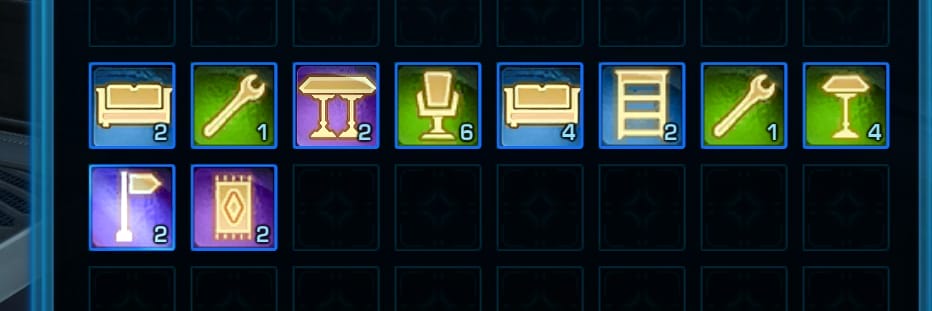
Be careful – once you use them you can no longer sell them or give them away, so think before you right-click any decorations you get! Once you have right-clicked a decoration item from your inventory, it will be added to your decorations list. That decoration will now be accessible by all your characters on your server in any of your strongholds. If you haven’t already, right-click and use all the free decorations you got from the strongholds quest.
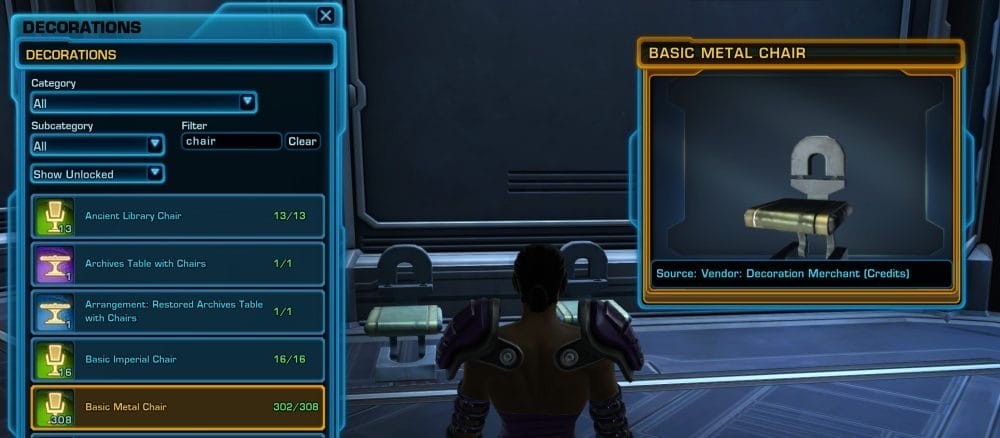
Once you place a decoration down, it will subtract 1 of those decorations from your available decorations. However you can pick it back up again and put it down somewhere else. You can have multiples of the same decoration as long as you acquire multiples of the item and use them. For example, you can have 4 Basic Metal Chairs as long as you buy four from the vendor, and you will be able to place a total of four down across all your strongholds.
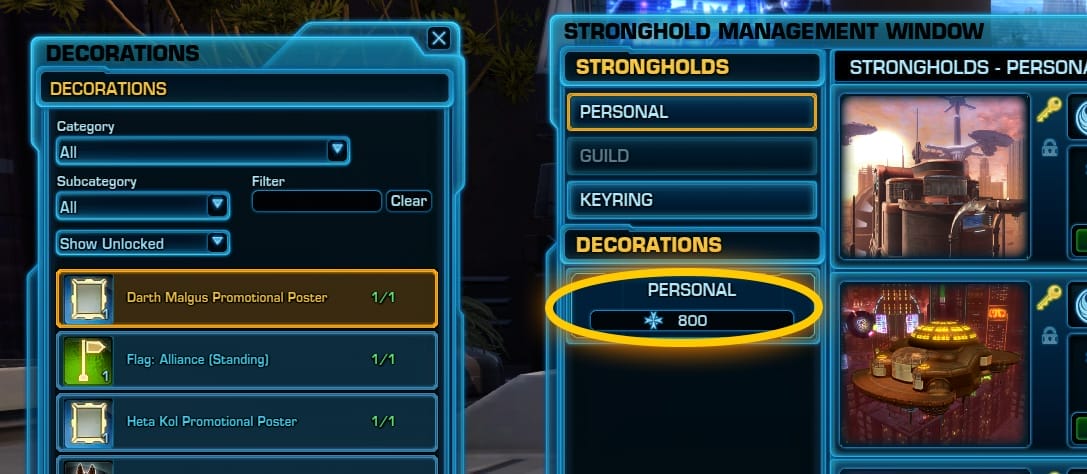
To view all your decorations, open the Stronghold Panel. On the left sidebar, click the ‘Personal’ button with a score under it. You can then sort to show by All, Unlocked and Available. This panel is just for checking which decorations you have – you do not decorate from here.
How to Decorate
Whenever you are in your own stronghold, you can use the green “Edit Mode” button to decorate your stronghold.
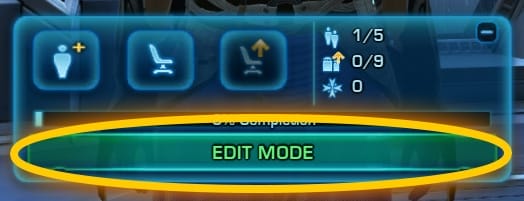
You can usually find it near the bottom of your User Interface.

When you are done decorating, you can press the “Hide Hooks” button in the same place to exit the decorating mode.
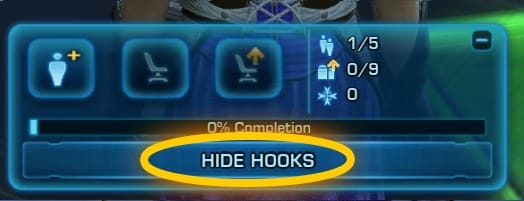
Once you are in Edit Mode, you will see a bunch of glowing squares appear around the room.

These are called Hooks. You can only place decorations on hooks, you can not put them wherever you would like. Decorations only fit onto certain types of hooks – for example, you can’t put a ceiling light on the floor, a large decoration might only fit on a centerpiece hook, and rugs will only fit on a rug hook.
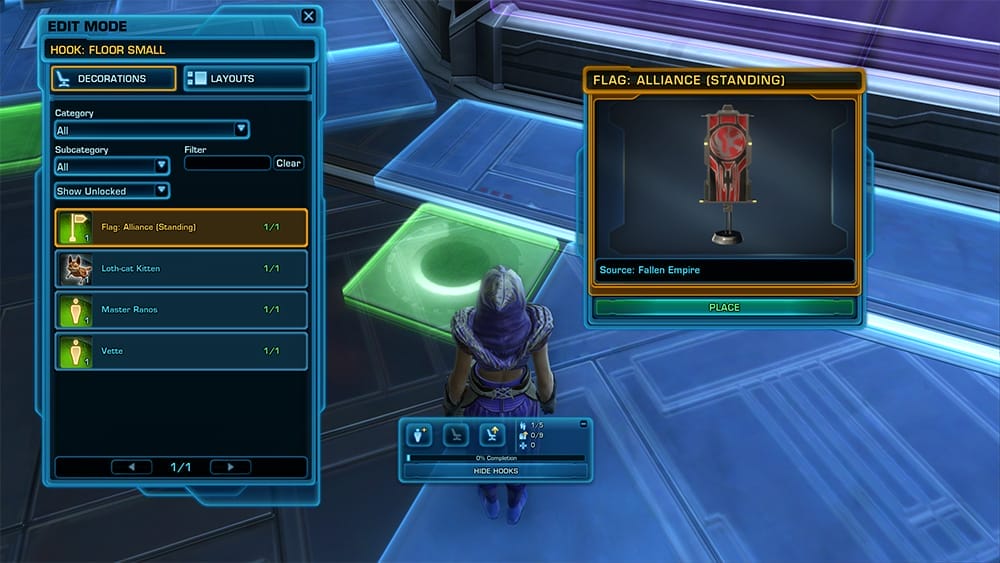
To place a decoration, right-click a glowing hook, which will open up the Decorations panel for decorating. By default, the Decorations list will show you decorations you have unlocked and fit in to that hook. If the number beside the decoration is green, that means you can put the decoration down by clicking “Place” under the preview of the decoration. If the number is red, it means you have the decoration available, but you’ve already put it down somewhere. If you want to see which decorations you actually have on hand to use, you can change the dropdown on the Decorations list from “Show Unlocked” to “Show Available”. If you have a lot of decorations, there’s also useful Category and subcategory dropdowns you can filters your decorations with, and the Search bar will search for decoration names if you want to place a specific decoration. The decoration list is a bit finicky – if you are trying to find a deco on the list, and it’s not showing up, you may need to erase the search, reset the categories and reset the dropdown to “Show All”.
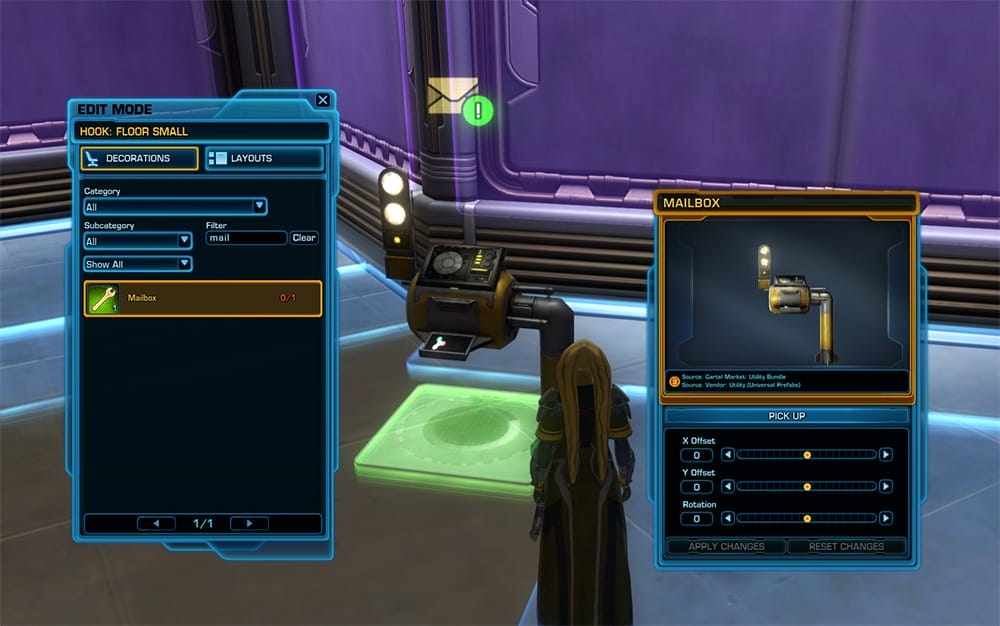
For your first decoration, I recommend placing down a Mailbox in one of the small green hooks on the floor, then using the “Hide Hooks” button to exit decorating, and look at your newest mail, as it contains another free decoration! This free decoration is called “Felusio Static (Basic Decoration)” and she actually acts as a vendor you can buy more decorations from, or sell junk items to. Make sure to claim her from your mail, and use her item from your inventory, as you won’t be able to place her decoration down until after you right-click the item in your inventory.
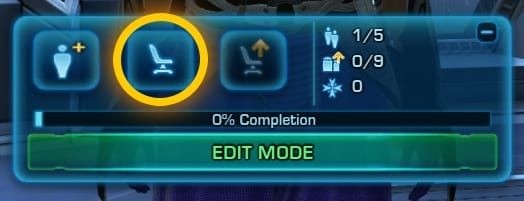
If you need help figuring out which hooks your new decorations fit on, you can roll over the item before you use it, or you can open your “Personal” decorations list using the “chair without an arrow” icon near your “Edit Mode” button, finding the item, then hovering your mouse over the decoration you want to learn about. In Felusio’s case, she’ll fit in a Floor Small hook or Floor Medium Narrow hook… but she won’t fit in any of the larger hooks.
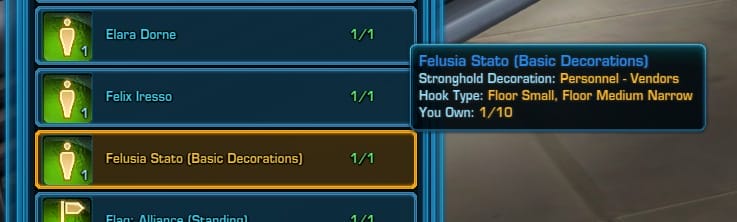
The second decoration you should place down is the Legacy Stronghold Storage decoration you also got for free from the quest into a different green hook, as it’s really handy for storing unbound or legacy-bound items when you aren’t in decorating mode.

Adjusting Decorations
Once you have placed a decoration, you can nudge it around using the X and Y Offset sliders under its preview. You can also spin it around with the Rotation slider. Unfortunately there’s no way to affect the height of the decoration, so there’s no way to stack or layer decorations. You don’t actually need to use the Apply Changes button, but if you want to reset all your offset and rotation, the Reset Changes button is useful to put the decoration back on the hook the way it started.
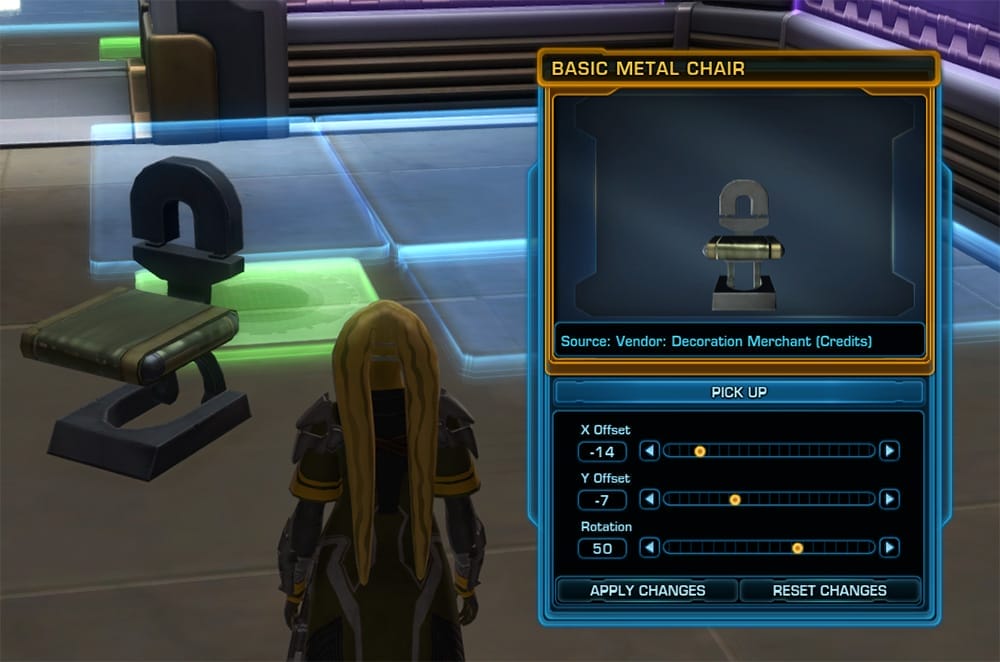
You can easily pick up decorations and move or remove them by right-clicking the hook they are on and clicking “Pick Up” under the preview. Placing down a decoration is never permanent. There is a common bug where you will right-click a hook with a decoration on it and the decoration adjustments panel just won’t show up – try either clearing out your search and categories, or try right-clicking and different type of empty hook and then right-click the hook you wanted to edit again.

There is also a button near the Edit Mode button called “Reset Decorations in Room” that looks like a chair with a golden up arrow. This is a very dangerous button – it may also pick up any and all decorations in any nearby rooms as well. Do not click this button unless you are 100% sure what it will be picking up, or you’ll be sad that you accidentally lost all your decorating work you did in a nearby room.

Each stronghold has a different number of decorations you can place in it. To see how many decorations you can put down in the stronghold your are currently in, hover over the percentage bar near the Edit Mode button and it will tell you how many total decorations you can put down and how many you have put down so far.
Hook Layouts
You can also sometimes change the layout of the hooks – for example, you could change one large blue square hook to four smaller green ones, if you wanted to place down four little decorations instead of a single medium sized one. To find out what layouts are available for a hook, right-click the hook and click the “Layouts” tab in the Decorations panel. You can click through the different hook options to see a preview of their layout. If you see one you like, select it, and click Apply Layout – just keep in mind it will reset and pickup any decorations that were on those hooks and you’ll need to re-place them.
Unlocking More of Your Stronghold
Many strongholds, including the starter strongholds, only allow you to walk through and decorate certain parts of the stronghold to start. You can walk up to the various doors in the stronghold, and it will tell you how many credits it costs to unlock more of the stronghold. The unlocks can often be very expensive! You might want to check a guide before spending credits on unlocking a Stronghold or its additional rooms so you know what you are paying for and decide if it’s worth it to you.
 Alderaan Stronghold
 Copero Stronghold
 Coruscant Stronghold
 Dantooine Farm Stronghold
 Dromund Kaas Stronghold
 Imperial Fleet Stronghold
 Manaan Stronghold
 Mek-Sha Stronghold
 Nar Shaddaa Stronghold
 Republic Fleet Stronghold
 Rishi Stronghold
 Stronghold Starter Guide
 SWTOR Strongholds Comparison
 Tatooine Stronghold
 Umbara Train Stronghold
 Yavin 4 Stronghold
Unlocking More Strongholds
You aren’t limited to a single stronghold. You can actually buy and decorate one of every available type of stronghold – the strongholds are quite different, and many players often purchase more than one. You can purchase more strongholds at the Stronghold Directory area on the Fleet, and some strongholds are found and unlocked through other areas of the game.
Conquest: One major reason to purchase and unlock multiple strongholds is to get a Conquest boost. Fully unlocking 6 strongholds and all their rooms will get you a 150% bonus to your conquest points, and you’ll get a partial bonus for every room you have unlocked. Your strongholds don’t have to be decorated, just unlocked, to get the bonus.

There are all kinds of strongholds available, some are very big and some are very small. Some are expensive and others can only be earned, not bought. Stronghold Comparison Guide
- Alderaan Stronghold
- Copero Stronghold
- Coruscant Stronghold
- Dantooine Farm Stronghold
- Dromund Kaas Stronghold
- Imperial Fleet Stronghold
- Manaan Stronghold
- Mek-Sha Stronghold
- Nar Shaddaa Stronghold
- Republic Fleet Stronghold
- Rishi Stronghold
- Tatooine Stronghold
- Umbara Train Stronghold
- Yavin 4 Stronghold
How to Invite Friends to Your Stronghold
Want to share your stronghold with a friend? There are three ways to invite someone you know to your stronghold:
1) If they are in your group or nearby, you can right click their name and invite them.

2) You can open your stronghold panel and click “Invite” under your stronghold. Or, you can invite your whole group!

3) You can give your friend a ‘key’.
 A bronze key will allow them to visit whenever they want.
 A silver key will allow them visit whenever they want and to invite others.
Only you can have a gold key to your stronghold which allows you to decorate. Sadly, you can not let friends decorate your personal stronghold.
How to Show Off Your Stronghold
Have you made your stronghold awesome? Decorated every room? Have more than just basic decorations? It’s time to show off!
Advertise & Invite on the Fleet
One way to show off your stronghold is to post in general chat on the fleet that you are giving a tour, then invite people. Make sure your house is well decorated and you are ready for strangers to come in – many people will comment or criticize on your stronghold if you are there. Be prepared to deal with strange people – if they annoy you, you can kick them out of your stronghold by entering their name in the Strongholds panel Bans button and type /ignore [theirname] so they can’t talk to you.
Publicly List Your Stronghold
You can list your stronghold so people can visit it without you inviting them.

When you publicly list your stronghold, others can go to the stronghold terminals and find your stronghold on a list of public strongholds. This allows others to come visit your stronghold as long as you are online – you do not need to be in your stronghold for them to come visit.
Be warned – they don’t have to leave once they have entered. If you do not want strangers in your house, do not list your stronghold publicly.
To publicly list your stronghold click the key symbol in the stronghold panel beside your stronghold. The symbols that appear below it will denote which faction can visit it. For some reason, although there is a button to allow the opposite faction to visit, it often doesn’t work and the stronghold will not show up in the opposite faction’s listings.
Public Listings
Want to get inspired and see how other players have decorated their strongholds? Players who have decorated their strongholds often list them on the public directory, which you can browse in the same spot you purchased your stronghold at. The public listings are vaguely sorted by how highly decorated the strongholds in the listings are – so start at the top and work your way down!
How far up the list your stronghold is listed is based on your Prestige score. Prestige Guide
How to Get Decorations
There are over 2,800 Decorations in the game – some are crafted, some are purchased from vendors, some are dropped from enemies and some are earned from achievements. Browse the entire collection of decorations or use the guides below to find some easier-to-get-decorations!
- Crafted Easy-to-Get Decorations in SWTOR
- Easy-to-Get Decorations in SWTOR
- Even More Easy-to-Get Decorations in SWTOR
- Stronghold Prestige Guide
The Most Useful Decorations
The most useful decorations to get are the ones you can use! I highly recommend placing down your legacy bank and mailbox first, which you get from your intial quest. You should also get a personal bank (green one), a guild bank (purple one, if you are in a guild), a GTN, and an augment kit station if you are max-level. You can view all the “useful” decorations here.
To get a personal bank, you can either craft one, buy one from the GTN, buy one from the Cartel market, or get one from the Security Key vendor.
To get a GTN, you can craft one, buy one from the GTN, or buy one from the Cartel Market. There’s two versions, a big one and a small one. They’re the same thing, they just look different.
You should also get a vendor of some kind you can sell junk items to – choose one here or use the Felusia Stato decoration you get from the initial quest!


Have a suggestion or correction? Go to the Swtorista Website Discord and post your report in the #decorations channel. You will need to make a free Discord account.

Strongholds Under Construction in Coruscant and Dromund Kaas
During the Vancouver Community Cantina, these images were released as part of the fan thumbdrive. They show construction of the highrise Capital planet strongholds.
Have a suggestion or correction? Go to the Swtorista Website Discord and post your report in the #decorations channel. You will need to make a free Discord account.

Strongholds will be Legacy-Wide Confirmed
We’ve finally gotten confirmation about how Strongholds will work in terms of Legacy with a quick note from Eric Musco on the devtracker.
Have a suggestion or correction? Go to the Swtorista Website Discord and post your report in the #decorations channel. You will need to make a free Discord account.


Summer of SWTOR Update
Although no new news has been released about Player Strongholds with the updated roadmap, we did get a reassurance that early access will still start on August 19th.
Have a suggestion or correction? Go to the Swtorista Website Discord and post your report in the #decorations channel. You will need to make a free Discord account.

- Decorations Source Achievement
- Decorations Source Star Fortress Star Fortress Achievements
- Achievement: An End to the Exarchs // Defeat all 6 Exarchs in Heroic Star Fortresses Starship Hook
- No GTN



- Decorations Source Cartel Market Cartel Packs Ultimate Cartel Pack Ceiling Hook
- GTN Yes

- Decorations Source Cartel Market Cartel Packs Ultimate Cartel Pack Ceiling Hook
- GTN Yes

-
Ceiling Hook
- No GTN
SW:TOR Strongholds Stream – with Eric, Toby, and Jack!
First Look Preview: Galactic Strongholds Decoration System on Wednesday, July 2nd @ 1:30PM PDT / 8:30PM GMT host by Eric Musco, Toby and Jack with brand new information and functionality display.
Have a suggestion or correction? Go to the Swtorista Website Discord and post your report in the #decorations channel. You will need to make a free Discord account.

-
Wall Small
- No GTN

-
Wall Small
- No GTN

-
Wall Small
- No GTN

-
Wall Small
- No GTN

-
Small
- No GTN

-
Large
- No GTN

-
Large
- No GTN
SWTOR Galactic Living Coruscant Apartment Livestream Notes from Dulfy.net
Check out Dulfy’s great notes on the stronghold livestream!
Have a suggestion or correction? Go to the Swtorista Website Discord and post your report in the #decorations channel. You will need to make a free Discord account.
SWTOR Galactic Living Dromund Kaas Livestream Notes on Dulfy.net
missed the stream or not interested in watching the whole hour? Dulfy’s got some great livestream notes up!
Have a suggestion or correction? Go to the Swtorista Website Discord and post your report in the #decorations channel. You will need to make a free Discord account.

SWTOR Galactic Living: Nar Shaddaa Sky Palace Player Housing Video Released + Video Breakdown
SWTOR Producer Jack Wood, gives a tour of the Nar Shaddaa Sky Palace, located on the smuggler’s moon. This dual-factioned stronghold puts you on top of the world on Nar Shaddaa, in SWTOR’s upcoming player housing. Here’s a breakdown of what is shown in the video.
Have a suggestion or correction? Go to the Swtorista Website Discord and post your report in the #decorations channel. You will need to make a free Discord account.

SWTOR Guild Strongholds Comparison
Guild Strongholds are Star Wars: The Old Republic’s version of housing, where you can create your own personal fortress and decorate it with Decorations you can collect form across the galaxy. Guild Strongholds are accessible by all guild members who have permission to visit, and they can be decorated by any guild member who has permission to decorate. Guild Strongholds also have a special feature that allow you to “donate” decorations for a small credit fee, rather than having to donate an actual item copy of the decoration.

There are 9 different Guild strongholds to choose from, and each one has a different cost, layout, theme and size. Your guild can only have 1 Flagship plus 1 Guild Stronghold of your choice, so you can only have one of the following strongholds for your guild available at a time.
Guild Stronghold Requirements
To purchase a Guild Stronghold, your guild must have a Guild Bank, and the correct amount of credits to unlock the Stronghold inside of the guild bank.

To purchase a guild bank, you must first have 12 unique characters in your guild (these can be your alts, have a friend invite them if you are trying to make a 1-man guild and remove them afterwards). To buy it, access the purple bank near the guild NPC.
Once you have a guild bank, head to the Stronghold terminal for the stronghold you want to buy – most are located in the Strongholds and Crew Skills section of the Republic or Imperial Fleet.
How are the Guild Strongholds different?
Location – The biggest difference between the guild strongholds is what planet they are located on – each guild stronghold has a different theme, for example the Alderaan Guild stronghold is a castle nestled in the snowy Alderaanian mountains, and the Nar Shaddaa Guild Stronghold is a floating casino cruising through Nar Shaddaa’s red sky and neon signs. Each one will have a different layout that fits its theme, and lots of little built-in details in the environment that match that planet it is located on. Even the lighting is different in each guild stronghold, with Tatooine being lit by a setting sun, and the Manaan Guild Stronghold has a strong bright blue-white light from the ocean and sky. Guilds have different ways of choosing which location they want their stronghold to be on – sometimes the guild leader simply picks their favorite, sometimes guilds pick the planet that best matches their guild theme, and other times they hand off the stronghold to roleplayers who can choose a stronghold based on the guilds roleplay headquarters.

Size – The guild strongholds also vary in size, with some being a lot larger than others. There’s no such thing as a “square foot” measurement when it comes to strongholds, but in general, the more expensive strongholds tend to have more space, more individual rooms, more hooks to place down decorations, and allow more guests to visit. The amount of people who can visit a guild stronghold varies from 30 to 75, depending on the stronghold chosen. So if you plan on having huge guild parties in the guild stronghold (not the Flagship) make sure to pick an appropriately-sized stronghold.

Cost – When choosing with stronghold to save up for, cost will also be a factor – some guild stronghold are much more expensive than others. The Coruscant and Dromund Kaas strongholds are by far the cheapest, and at 50,000 Credits, they are considered the “starter” guild strongholds and are quite easy to get. All guild strongholds have an initial cost and a full-unlock cost – for example, to enter and decorate the first area of the Alderaan Guild Stronghold, it costs 20 million credits, but if you want to unlock all the Alderaan guild rooms, it will cost you a total of 50 million credits. Keep in mind that Guild Strongholds, even though they have a higher cost, look the same and have the same layout as personal strongholds.

Guild Stronghold Comparison
| Stronghold | Initial Cost | Full Cost | Visitors | Decorations | Rooms |
|---|---|---|---|---|---|
| Coruscant Stronghold | 50,000 | 4,370,000 | 50 | 350 | 10 |
| Dromund Kaas Stronghold | 50,000 | 4,370,000 | 50 | 350 | 10 |
| Nar Shaddaa Stronghold | 2,000,000 | 28,750,000 | 50 | 475 | 10 |
| Umbara Train Stronghold | 3,020,000 | 8,511,000 | 30 | 425 | 3 |
| Tatooine Stronghold | 15,000,000 | 31,600,000 | 50 | 300 | 8 |
| Manaan Stronghold | 15,000,000 | 32,400,000 | 30 | 650 | 5 |
| Yavin 4 Stronghold | 15,000,000 | 42,000,000 | 60 | 750 | 10 |
| Alderaan Stronghold | 20,000,000 | 50,500,000 | 70 | 1035 | 10 |
| Rishi Stronghold | 17,000,000 | 86,700,000 | 75 | 1600 | 14 |
| Dantooine Stronghold | 6,000,000 + Rep | 10,000,000 + Rep | 70 | 1580 | 4 |
| Republic Fleet Stronghold | Not Available | - | - | - | - |
| Imperial Fleet Stronghold | Not Available | - | - | - | - |
| Mek-Sha Stronghold | Not Available | - | - | - | - |
Guild Flagships
Guild Flagships are a type of player housing, but they are different than strongholds. Guild Flagships can be decorated and visited, but they also have a functional use for guilds.

Unlike your Guild Stronghold, you do not get to “choose” a Guild Flagship. You simply get the Republic Flagship if you are a Republic guild, or an Imperial Flagship if you are an Imperial Guild. You can get a Guild Flagship and a Guild Stronghold.


Guild Stronghold Features
Each guild stronghold has unique features that make it stand out – check out the individual stronghold guides for layouts, room costs ,and screenshots of every room in every stronghold.
Alderaan Guild Stronghold

Special Features:
- Alderaan Stronghold Tour Guide
- Planet: Alderaan
- Initial Guild Cost: 20,000,000 credits
- Full Guild Cost: 50,500,000 credits
- Visitors: 70 People
- Decorations: 1,035 Decorations
- Rooms: 10 Rooms
- Very large in size and number of decorations hooks
- Multiple different areas – front grounds, castle inside, upper snowy area and upper buildings
- Waterfall balcony
- Fancy indoors walls and windows
- Large stain glass window inside castle
- Lots of trees and mountains outside
- Secret cave
- Killik cave with adjustable number of killiks
- Free throne background decoration
- Training Dummy
- Taxi
- Secret Achievement with Legacy title reward
- Four large starship hooks in the front and one hidden in the back
Coruscant Guild Stronghold

Special Features:
- Coruscant Stronghold Tour Guide
- Planet: Coruscant
- Initial Guild Cost: 50,000 credits
- Full Guild Cost: 4,370,000 credits
- Visitors: 50 People
- Decorations: 350 Decorations
- Rooms: 10 Rooms
- The least expensive stronghold, considered a starter stronghold
- On the smaller side of strongholds, but not small
- Fully unlockable even for Free-to-Play and Preferred players credit limit
- Can only be purchased on Republic side, but can be used on either side once purchased
- Outside balcony, huge windowed room and many indoor rooms
- Large centerpiece hook on balcony
- Ambient quiet speeder traffic sounds
- Sunset Coruscant lighting, orange-yellow
- Decoratable double staircases
- Exact same layout as the Dromund Kaas stronghold
- No Taxi
- No Training Dummy
Dantooine Guild Stronghold

Special Features:
- Dantooine Stronghold Tour Guide
- Planet: Dantooine
- Initial Guild Cost: 6,000,000 credits + Reputation
- Full Guild Cost: 10,000,000 credits + Reputation
- Visitors: 70
- Decorations: 1,580
- Rooms: 2 rooms, a large greenhouse, a barn with a loft, a cave
- Earned in-game via the Dantooine Biomes
- Large grassy areas
- Large Cave
- Giant glass greenhouse
- 3 Starship hooks in the front, 5 in the landing area, 1 in the greenhouse
- No Taxi
- No Training Dummy
Dromund Kaas Guild Stronghold

Special Features:
- Dromund Kaas Stronghold Tour Guide
- Planet: Dromund Kaas
- Initial Guild Cost: 50,000 credits
- Full Guild Cost: 4,370,000 credits
- Visitors: 50 People
- Decorations: 350 Decorations
- Rooms: 10 Rooms
- The least expensive stronghold, considered a starter stronghold
- On the smaller side of strongholds, but not small
- Fully unlockable even for Free-to-Play and Preferred players credit limit
- Can only be purchased on Imperial side, but can be used on either side once purchased
- Outside balcony, huge windowed room and many indoor rooms
- Large centerpiece hook on balcony
- Ambient quiet rain storm sounds
- Dark Dromund Kaas stormy weather lighting, blue-white
- Rain falling against windows animation
- Decoratable double staircases
- Exact same layout as the Coruscant stronghold
- No Taxi
- No Training Dummy
Manaan Guild Stronghold

Special Features:
- Manaan Stronghold Tour Guide
- Planet: Manaan
- Initial Guild Cost: 15,000,000 credits
- Full Guild Cost: 32,400,000 credits
- Visitors: 30 People
- Decorations: 650 Decorations
- Rooms: 5 Rooms
- Large outdoor terrace
- Strong bright white lighting
- Upper story garden area
- Below-water rooms
- Hooks out in the water outside the submerged windows
- Starship hook up high but inaccessible
- No Taxi
- No Training Dummy
Nar Shaddaa Guild Stronghold

Special Features:
- Nar Shaddaa Stronghold Tour Guide
- Planet: Nar Shaddaa
- Initial Guild Cost: 2,000,000 credits
- Full Guild Cost: 28,750,000 credits
- Visitors: 50 People
- Decorations: 475 Decorations
- Rooms: 10 Rooms
- The original luxury stronghold when they were released, now the least expensive luxury stronghold
- Free-to-play and Preferred players can purchase the first six rooms even with the credit cap
- Casino/gambling feel and shape
- Multiple balconies and overlooks
- Large windowed rooms
- Red lighting
- Large Starship hook that you can jump down to
- No Taxi
- No Training Dummy
Rishi Guild Stronghold

Special Features:
- Rishi Stronghold Tour Guide
- Planet: Rishi
- Initial Guild Cost: 17,000,000 credits
- Full Guild Cost: 86,700,000 credits
- Visitors: 75 People
- Decorations: 1,600 Decorations
- Rooms: 14 Rooms
- The largest stronghold with the most number of hooks (1,600)
- The most expensive stronghold to fully unlock (20 million)
- Dueling arena with lockable doors
- Floating pirate starship with hull rooms and deck
- Custom huttball match deck with lockable doors, teams and score counter
- White sands beach
- Treasure island
- Cliff-side apartment
- Climbing rope
- Fireable cannon
- Taxi
- Summonable Training Dummy
Tatooine Guild Stronghold

Special Features:
- Tatooine Stronghold Tour Guide
- Planet: Tatooine
- Initial Guild Cost: 15,000,000 credits
- Full Guild Cost: 31,600,000 credits
- Visitors: 50 People
- Decorations: 300 Decorations
- Rooms: 8 Rooms
- Large overlook balcony
- Twin settings suns
- Sandcrawler on the horizon
- Sunset lighting
- Lots of sand
- Many small indoor rooms
- Very large open-ceiling circular starship room
- Starship pad
- Outside hook arrangements
- No Taxi
- No Training Dummy
Umbara Train Guild Stronghold

Special Features:
- Umbara Train Stronghold Tour Guide
- Planet: Umbara Train
- Initial Guild Cost: 3,020,000 credits
- Full Guild Cost: 8,511,000 credits
- Visitors: 30 People
- Decorations: 425 Decorations
- Rooms: 3 Rooms
- Moving train stronghold, highly animated
- The rooms are railcars
- Can travel on top and through the rail cars, and decorate inside and above the cars
- Grapple hooks
- Taxi
- No Training Dummy
Yavin 4 Guild Stronghold

Special Features:
- Yavin 4 Stronghold Tour Guide
- Planet: Yavin 4
- Initial Guild Cost: 15,000,000 credits
- Full Guild Cost: 42,000,000 credits
- Visitors: 60 People
- Decorations: 750 Decorations
- Rooms: 10 Rooms
- Large starship hook where you load in
- Jungle and blue sky sunset view
- Waterfall in center of stronghold
- Large temple building with roof access via grapple hooks
- Waterfall bridge
- Huge outdoor area with many hooks
- Two smaller temples each with roof access
- Watchtower with elevator
- Secret tunnel cavern
- Basement room with statues
- Small jungle balcony
- Causes certain statue decorations to grow moss
- No Taxi
- No Training Dummy
Imperial Fleet Stronghold – Not Available for Guilds

Due to the unique nature of how you unlock the Imperial Fleet Stronghold with Galactic Seasons tokens, it is not available as a guild stronghold, and is only available as a personal stronghold.
Republic Fleet Guild Stronghold

Due to the unique nature of how you unlock the Republic Fleet Stronghold with Galactic Seasons tokens, it is not available as a guild stronghold, and is only available as a personal stronghold.
Mek-Sha Guild Stronghold

Due to the unique nature of how you unlock the Mek-Sha Stronghold with Galactic Seasons tokens, it is not available as a guild stronghold, and is only available as a personal stronghold.
 Thank you player Zahk for helping translate the numbers over to this guide for Guild Strongholds!
Have a suggestion or correction? Go to the Swtorista Website Discord and post your report in the #decorations channel. You will need to make a free Discord account.

SWTOR How to Get a Guild Flagship
A guild flagship is a decoratable area unique to your guild, which will allow you to participate more fully in conquests in SWTOR. It requires a lot of resources to set up, including 8 million credits. This guide will explain how!
Updated for 7.4
You will need:
- A Guild (4 people together in a group required, the guild-maker must be a subscriber)
- A Guild Bank (12 characters in the guild + 600k credits)
- 8 million credits in the Guild Bank (to buy the Flagship, it used to be 50 mill)
- 600,000 credits on-hand to buy the Guild Bank
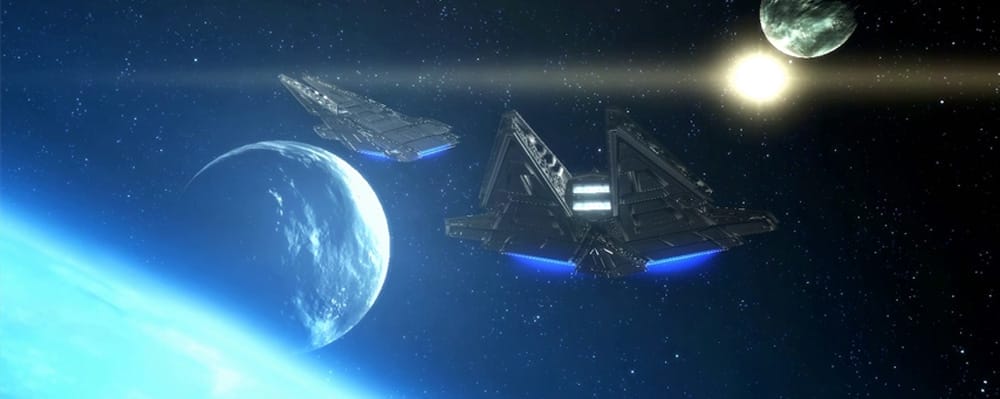
1. Create a Guild (requires 4 people)
You need yourself plus three other people in a group together to create a guild. Head the the Galactic Trade Market part of the fleet, and look for the purple key symbol. Speak to the NPC there to start your guild. The other members need to be in your group, but not present. You may remove them from your guild afterwards.


2. Buy a Guild Bank (requires 2+ people, 12 total characters and 600,000 credits)
You must have a guild bank to buy a guild flagship! To purchase a guild bank, you must first have 12 unique characters in your guild (these can be your alts, have a friend invite them if you are trying to make a 1-man guild and remove them afterwards). To buy it, access the purple bank near the guild NPC.
Deposit at least 8,000,000 (8 million) credits into your guild bank (cost of a guild flagship). You must have these credits in the guild bank, not your inventory!
3. Buy a Guild Flagship
In the Strongholds & Crew Skills part of the fleet, go to the flagship terminal (it is near the other stronghold terminals, but in a different room). On the Purchase tab, press the Purchase button.


Buying a flagship costs 8,000,000 credits. You must have placed these credits in your guild bank first.
4. Travel to Flagship
To travel to your purchased flagship, open the strongholds panel. Click the guild tab, then click the Travel button. This will take you to your flagship.

5. Rename Your Flagship
You may save this step until later, if you want to poll your guild or think about it first. Open the strongholds panel, and choose the guild tab. There will be a small rename button on the top right. Be careful, you can only rename your flagship for free once! If you do not rename it, it will simply be called “Flagship: <Guild Name>”.

Guild Perks
Guild Perks are a way of offering members in a Star Wars: The Old Republic small bonuses in the game for contributing and being a member of a guild. These are unlocked through owning a Flagship. Learn more in the Guild Perks Guide!

Have a suggestion or correction? Go to the Swtorista Website Discord and post your report in the #decorations channel. You will need to make a free Discord account.

SWTOR May Insider Video + Strongholds Video Breakdown & Screenshots
SWTOR Producer Jack Wood and Community Manager Eric Musco offer an inside look at the latest exciting news for Galactic Strongholds Digital Expansion including the first look at pets inside homes, speeders up close and the transformation of an empty room into one filled with trophies and decorations.
Have a suggestion or correction? Go to the Swtorista Website Discord and post your report in the #decorations channel. You will need to make a free Discord account.

SWTOR Player Housing Features
It’s exactly what many players have been waiting for – a personal, customizable space they can call their own on TOR. These strongholds will be apartment-like complexes located on various planets that players can decorate with items from around the galaxy.
Have a suggestion or correction? Go to the Swtorista Website Discord and post your report in the #decorations channel. You will need to make a free Discord account.
SWTOR Stronghold Locations
To learn how to get your first stronghold, read the SWTOR Stronghold Guide.


Have a suggestion or correction? Go to the Swtorista Website Discord and post your report in the #decorations channel. You will need to make a free Discord account.

SWTOR Strongholds Comparison
Strongholds are Star Wars: The Old Republic’s version of housing, where you can create your own personal fortress and decorate it with Decorations you can collect form across the galaxy. There are 12 different strongholds to choose from, and each one has a different cost, layout, theme and size. You can earn up to one of every stronghold so you don’t need to choose just one – but some of the strongholds are quite expensive, so you may want to work on saving up for one you really like first!
How are the Strongholds different?
Location – The biggest difference between the strongholds is what planet they are located on – each stronghold has a different theme, for example the Alderaan stronghold is a castle nestled in the snowy Alderaanian mountains, and the Nar Shaddaa Stronghold is a floating casino cruising through Nar Shaddaa’s red sky and neon signs. Each one will have a different layout that fits its theme, and lots of little built-in details in the environment that match that planet it is located on. Even the lighting is different in each stronghold, with Tatooine being lit by a setting sun, and Mek-Sha only lit by the glow of the nearby neon signs and asteroid shield. Most players pick their favorite stronghold based on the way it looks.
Size – The strongholds also vary in size, with some being a lot larger than others. There’s no such thing as a “square foot” measurement when it comes to strongholds, but in general, the more expensive strongholds tend to have more space, more individual rooms, more hooks to place down decorations, and allow more guests to visit. While the larger strongholds are often considered more desirable by players, many players also like the smaller apartment-like strongholds which are a more realistic size for a house.
Cost – When choosing with stronghold to save up for, cost will also be a factor – some stronghold are much more expensive than others. The Coruscant and Dromund Kaas strongholds are by far the cheapest, and at 5,000 Credits, they are considered the “starter” strongholds and are quite easy to get. Almost all strongholds also have an initial cost and a full-unlock cost – for example, to enter and decorate the first area of the Alderaan Stronghold, it costs 4 million credits, but if you want to unlock all the Alderaan rooms, it will cost you a total of 17 million credits. Other strongholds don’t cost any credits at all, but you will need to earn and save up another type of currency to buy them, like Galactic Seasons Tokens.
Stronghold Comparison
| Stronghold | Initial Cost | Full Cost | Visitors | Decorations | Rooms |
|---|---|---|---|---|---|
| Coruscant Stronghold | 5,000 / 500 CC | 1.45 million / 4,000 CC | 50 | 350 | 10 |
| Dromund Kaas Stronghold | 5,000 / 500 CC | 1.45 million / 4,000 CC | 50 | 350 | 10 |
| Nar Shaddaa Stronghold | 250k / 500 CC | 8.5 million / 11,750 CC | 50 | 475 | 10 |
| Umbara Train Stronghold | None | 5.215 million / 3.01 million + 2,450 CC | 30 | 425 | 3 |
| Imperial Fleet Stronghold | None | x8 Galactic Seasons Tokens | 30 | 400 | 4 |
| Republic Fleet Stronghold | None | x8 Galactic Seasons Tokens | 30 | 400 | 4 |
| Mek-Sha Stronghold | None | x14 Galactic Seasons Tokens | 30 | 500 | 6 |
| Tatooine Stronghold | 2.5 million / 2,500 CC | 9 million / 10,100 CC | 50 | 300 | 8 |
| Manaan Stronghold | 2.5 million / 2,500 CC | 8,375,000 / 7,000 CC | 30 | 650 | 5 |
| Yavin 4 Stronghold | 2.5 million/ 2,500 CC | 13 million / 11,000 CC | 60 | 750 | 10 |
| Alderaan Stronghold | 4 million / 1,900 CC | 17.6 million / 8,900 CC | 70 | 1035 | 10 |
| Rishi Stronghold | 3 million / 2,650 CC | 19.85 million / 15,075 CC | 75 | 1600 | 14 |
| Dantooine Stronghold | 6,000,000 + Rep | 4.25 million + Reputation | 70 | 1580 | 4 |
Stronghold Features
Each stronghold has unique features that make it stand out – check out the individual stronghold guides for layouts, room costs ,and screenshots of every room in every stronghold.
Alderaan Stronghold
Special Features:
- Alderaan Stronghold Tour Guide
- Planet: Alderaan
- Initial Cost: 4 million / 1,900 Cartel Coins
- Full Cost: 17.6 million Credits / 8,900 Cartel Coins
- Visitors: 70 People
- Decorations: 1,035 Decorations
- Rooms: 10 Rooms
- Very large in size and number of decorations hooks
- Multiple different areas – front grounds, castle inside, upper snowy area and upper buildings
- Waterfall balcony
- Fancy indoors walls and windows
- Large stain glass window inside castle
- Lots of trees and mountains outside
- Secret cave
- Killik cave with adjustable number of killiks
- Free throne background decoration
- Training Dummy
- Taxi
- Secret Achievement with Legacy title reward
- Four large starship hooks in the front and one hidden in the back
Coruscant Stronghold
Special Features:
- Coruscant Stronghold Tour Guide
- Planet: Coruscant
- Initial Cost: 5,000 / 500 Cartel Coins
- Full Cost: 1.45 million Credits / 4,000 Cartel Coins
- Visitors: 50 People
- Decorations: 350 Decorations
- Rooms: 10 Rooms
- The least expensive stronghold, considered a starter stronghold
- On the smaller side of strongholds, but not small
- Fully unlockable even for Free-to-Play and Preferred players credit limit
- Can only be purchased on Republic side, but can be used on either side once purchased
- Outside balcony, huge windowed room and many indoor rooms
- Large centerpiece hook on balcony
- Ambient quiet speeder traffic sounds
- Sunset Coruscant lighting, orange-yellow
- Decoratable double staircases
- Exact same layout as the Dromund Kaas stronghold
- No Taxi
- No Training Dummy
Dantooine Guild Stronghold
Special Features:
- Dantooine Stronghold Tour Guide
- Planet: Dantooine
- Initial Guild Cost: 250,000 credits + Reputation
- Full Guild Cost: 4,250,000 credits + Reputation
- Visitors: 70
- Decorations: 1,580
- Rooms: 2 rooms, a large greenhouse, a barn with a loft, a cave
- Earned in-game via the Dantooine Biomes
- Large grassy areas
- Large Cave
- Giant glass greenhouse
- 3 Starship hooks in the front, 5 in the landing area, 1 in the greenhouse
- No Taxi
- No Training Dummy
Dromund Kaas Stronghold
Special Features:
- Dromund Kaas Stronghold Tour Guide
- Planet: Dromund Kaas
- Initial Cost: 5,000 / 500 Cartel Coins
- Full Cost: 1.45 million Credits / 4,000 Cartel Coins
- Visitors: 50 People
- Decorations: 350 Decorations
- Rooms: 10 Rooms
- The least expensive stronghold, considered a starter stronghold
- On the smaller side of strongholds, but not small
- Fully unlockable even for Free-to-Play and Preferred players credit limit
- Can only be purchased on Imperial side, but can be used on either side once purchased
- Outside balcony, huge windowed room and many indoor rooms
- Large centerpiece hook on balcony
- Ambient quiet rain storm sounds
- Dark Dromund Kaas stormy weather lighting, blue-white
- Rain falling against windows animation
- Decoratable double staircases
- Exact same layout as the Coruscant stronghold
- No Taxi
- No Training Dummy
Imperial Fleet Stronghold
Special Features:
- Imperial Fleet Stronghold Tour Guide
- Planet: Imperial Fleet
- Initial Cost: None
- Full Cost: x8 Galactic Seasons Tokens
- Visitors: 30 People
- Decorations: 400 Decorations
- Rooms: 4 Rooms
- Doesn’t cost credits, doesn’t have additional rooms to unlock, the cost unlocks the entire stronghold at once
- The smallest of the strongholds, a very small compact apartment
- Can only be purchased on Imperial side, but can be used on either side once purchased
- View of the Imperial Fleet VIP area from one of the room’s windows
- View of the Imperial Fleet space ships from another window
- Large octagonal room
- Exact same layout as the Republic Fleet stronghold
- No Taxi
- No Training Dummy
Manaan Stronghold
Special Features:
- Manaan Stronghold Tour Guide
- Planet: Manaan
- Initial Cost: 2.5 million / 2,500 Cartel Coins
- Full Cost: 8,375,000 Credits / 7,000 Cartel Coins
- Visitors: 30 People
- Decorations: 650 Decorations
- Rooms: 5 Rooms
- Large outdoor terrace
- Strong bright white lighting
- Upper story garden area
- Below-water rooms
- Hooks out in the water outside the submerged windows
- Starship hook up high but inaccessible
- No Taxi
- No Training Dummy
Mek-Sha Stronghold
Special Features:
- Mek-Sha Stronghold Tour Guide
- Planet: Mek-Sha
- Initial Cost: None
- Full Cost: x14 Galactic Seasons Tokens
- Visitors: 30 People
- Decorations: 500 Decorations
- Rooms: 6 Rooms
- Doesn’t cost credits, doesn’t have additional rooms to unlock, the cost unlocks the entire stronghold at once
- Doesn’t feel as big as some of the other strongholds, but isn’t small
- Industrial feel, can see the shipping crates, neon signs and asteroid shield of Mek-Sha
- Lower and upper balcony
- Large concert-like room with small stage
- Large stairwell with large window
- No Taxi
- No Training Dummy
Nar Shaddaa Stronghold
Special Features:
- Nar Shaddaa Stronghold Tour Guide
- Planet: Nar Shaddaa
- Initial Cost: 250k / 500 Cartel Coins
- Full Cost: 8.5 million Credits / 11,750 Cartel Coins
- Visitors: 50 People
- Decorations: 475 Decorations
- Rooms: 10 Rooms
- The original luxury stronghold when they were released, now the least expensive luxury stronghold
- Free-to-play and Preferred players can purchase the first six rooms even with the credit cap
- Casino/gambling feel and shape
- Multiple balconies and overlooks
- Large windowed rooms
- Red lighting
- Large Starship hook that you can jump down to
- No Taxi
- No Training Dummy
Republic Fleet Stronghold
Special Features:
- Republic Fleet Stronghold Tour Guide
- Planet: Republic Fleet
- Initial Cost: None
- Full Cost: x8 Galactic Seasons Tokens
- Visitors: 30 People
- Decorations: 400 Decorations
- Rooms: 4 Rooms
- Doesn’t cost credits, doesn’t have additional rooms to unlock, the cost unlocks the entire stronghold at once
- The smallest of the strongholds, a very small compact apartment
- Can only be purchased on Republic side, but can be used on either side once purchased
- View of the Republic Fleet VIP area from one of the room’s windows
- View of the Republic Fleet space ships from another window
- Large octagonal room
- Exact same layout as the Imperial Fleet stronghold
- No Taxi
- No Training Dummy
Rishi Stronghold
Special Features:
- Rishi Stronghold Tour Guide
- Planet: Rishi
- Initial Cost: 3 million / 2,650 Cartel Coins
- Full Cost: 19.85 million Credits / 15,075 Cartel Coins
- Visitors: 75 People
- Decorations: 1,600 Decorations
- Rooms: 14 Rooms
- The largest stronghold with the most number of hooks (1,600)
- The most expensive stronghold to fully unlock (20 million)
- Dueling arena with lockable doors
- Floating pirate starship with hull rooms and deck
- Custom huttball match deck with lockable doors, teams and score counter
- White sands beach
- Treasure island
- Cliff-side apartment
- Climbing rope
- Fireable cannon
- Taxi
- Summonable Training Dummy
Tatooine Stronghold
Special Features:
- Tatooine Stronghold Tour Guide
- Planet: Tatooine
- Initial Cost: 2.5 million / 2,500 Cartel Coins
- Full Cost: 9 million Credits / 10,100 Cartel Coins
- Visitors: 50 People
- Decorations: 300 Decorations
- Rooms: 8 Rooms
- Large overlook balcony
- Twin settings suns
- Sandcrawler on the horizon
- Sunset lighting
- Lots of sand
- Many small indoor rooms
- Very large open-ceiling circular starship room
- Starship pad
- Outside hook arrangements
- No Taxi
- No Training Dummy
Umbara Train Stronghold
Special Features:
- Umbara Train Stronghold Tour Guide
- Planet: Umbara Train
- Initial Cost: None
- Full Cost: 5.215 million Credits / 3.01 million Credits + 2,450 Cartel Coins
- Visitors: 30 People
- Decorations: 425 Decorations
- Rooms: 3 Rooms
- Moving train stronghold, highly animated
- The rooms are railcars
- Can travel on top and through the rail cars, and decorate inside and above the cars
- Grapple hooks
- Taxi
- No Training Dummy
Yavin 4 Stronghold
Special Features:
- Yavin 4 Stronghold Tour Guide
- Planet: Yavin 4
- Initial Cost: 2.5 million/ 2,500 Cartel Coins
- Full Cost: 13 million Credits / 11,000 Cartel Coins
- Visitors: 60 People
- Decorations: 750 Decorations
- Rooms: 10 Rooms
- Large starship hook where you load in
- Jungle and blue sky sunset view
- Waterfall in center of stronghold
- Large temple building with roof access via grapple hooks
- Waterfall bridge
- Huge outdoor area with many hooks
- Two smaller temples each with roof access
- Watchtower with elevator
- Secret tunnel cavern
- Basement room with statues
- Small jungle balcony
- Causes certain statue decorations to grow moss
- No Taxi
- No Training Dummy
Have a suggestion or correction? Go to the Swtorista Website Discord and post your report in the #decorations channel. You will need to make a free Discord account.


- Decorations Source Galactic Seasons
- Decorations Source Galactic Seasons Galactic Seasons Tokens
- Cost:
 3 Galactic Seasons Tokens
 - Vendor Availability: Group B / Week 2 Medium Large
- GTN No
Synthetic Prefab Decorations
 Bought and sold on the GTN from other players


 Crafted by Armormechs, Armstechs or Cybertechs
Have a suggestion or correction? Go to the Swtorista Website Discord and post your report in the #decorations channel. You will need to make a free Discord account.
Synthweaving Prefabs
Bought and sold on the GTN from other players


 Crafted by Artifice, Biochem and Synthweaving
Have a suggestion or correction? Go to the Swtorista Website Discord and post your report in the #decorations channel. You will need to make a free Discord account.

-
Large
- No GTN


-
Centerpiece Hook
- No GTN

- Decorations Source Achievement Small Narrow
- No GTN

-
Small Narrow Medium
- No GTN

 Discord
  Email swtorista@gmail.com
 Bluesky @swtorista.com
 Reddit /u/swtorista
 Twitch Swtorista
 Youtube
 Patreon
 Twitter @swtorista