



























 Defense
 Vigilance
 Seer
Seer



 How to Craft
 Choose a Crew Skill
 Armormech
 Armstech
 Artifice
 Biochem
 Cybertech
 Synthweaving
 How to Craft Fast
 Gathering Guide
 Rare Materials Guide
 White Materials Guide
 Jawa Junk
 Augments
 Medpacs, Stims and Adrenals
 Synthweaving Crafting Tree




 Crafted Decorations
 Crafted Mounts
 Crafted Dyes
 Crafted Crystals
 Events Calendar
 Galactic Seasons
 PvP Seasons
 Bounty Event
 Double XP Event
 Feast of Prosperity
 Gree Event
 Life Day
 Nightlife Event
 Pirate Incursion Event
 Rakghoul Event
 Spring Abundance Festival
 Swoop Event
 Accessibility HubAll Accessibility guides and info
 DeafPlaying while deaf or hearing-impaired
 BlindPlaying while visually impaired or with low vision
 ColorblindPlaying with colorblindness and settings options
 AnxietyPlaying with general anxiety or social anxiety

 Jedi Knight
 Jedi Consular
 Trooper
 Smuggler
 Sith Warrior
 Sith Inquisitor
 Bounty Hunter
 Imperial Agent
 Bounty Hunter
 Imperial Agent
 Jedi
Jedi Jedi Consular
 Jedi Knight
 Sith
Sith Sith Inquisitor
 Sith Warrior
 Smuggler
 Trooper
 Legacy Gear
 Lightsabers
 Double-Bladed Lightsabers
 Vibroswords
 Double-Bladed Vibroswords
 Blaster Pistols
 Blaster Rifles
 Sniper Rifles
 Blaster Cannons

PH4-LNX, sometimes known as PH4 or Fay, is a special companion you can only get from Galactic Seasons. PH4-LNX had become retired in the past at the end of the first season, but has now returned as part of Galactic Seasons, Season 10, called Secrets of the Syndicate, which is focused around returning rewards from Season 1 and Season 3 and the rewards are themed around Atluur and PH4-LNX the returning companions. PH4-LNX is available for both free-to-play and subscribed players during the Season.
Contents
How to Get PH4-LNX

Getting PH4-LNX is actually pretty easy, but it isn’t obvious how it works – especially since some of the objectives require PH4-LNX when you don’t even have her yet!
- Do Galactic Seasons Objectives to earn 8 Season Points
- Complete Level 5 of Galactic Seasons
- Claim the PH4-LNX Protocal Lockbox from the track
- Use the item in your inventory
Step 1 – Galactic Seasons Objectives
To earn rewards during Galactic Seasons, you complete objectives, which earns you points. Earning points helps you work your way up the track, and earning your way up the track gets you rewards.
To open the Galactic Seasons menu, roll over the icon of a person in the main menu, and choose Login & Seasons Rewards from the dropdown menu. There are multiple tabs for this window, make sure to select Galactic Seasons at the top.
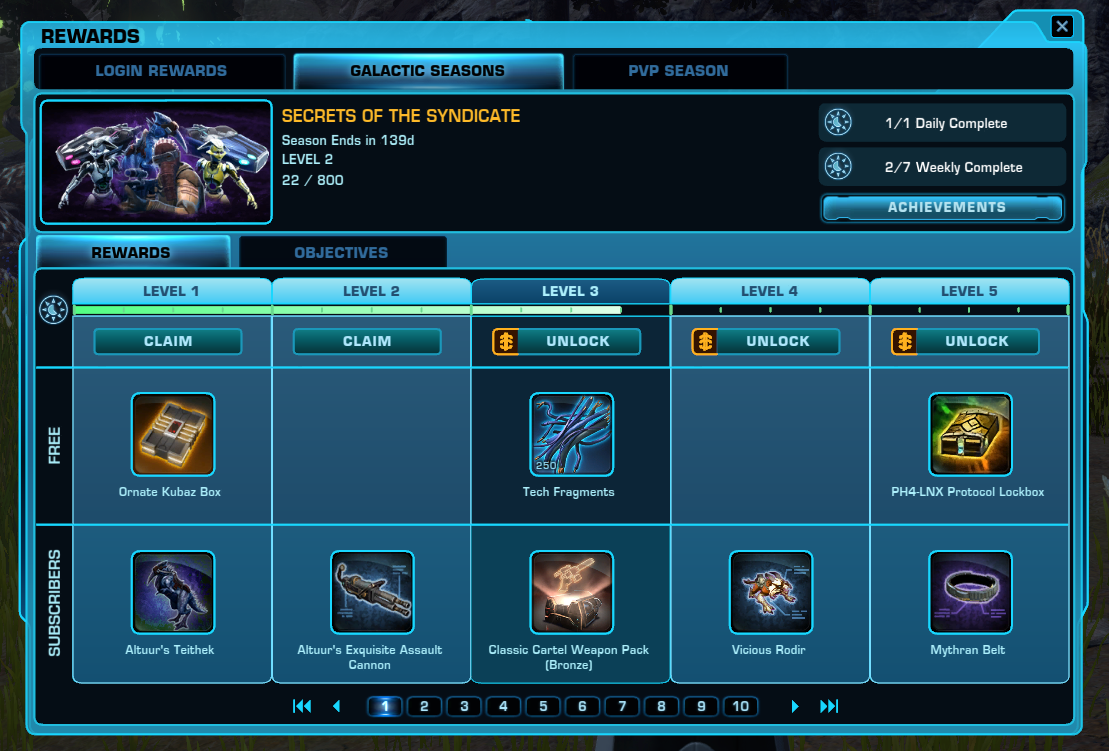
To get PH4-LNX during Galactic Season 10, which is March 10 to July 27, 2026, you will need to complete the fifth level of Galactic Seasons, which is about 40 points. You can get the points from doing Objectives in the Objectives tab, above the track.

Some objectives require PH4-LNX, which you can’t do yet, but most don’t require her. You only really need to complete one or two objectives to get enough points to unlock the first level of the track – you can see how many points each objective gives you on the right hand side of the objective – you only need 8 points total. The objectives rotate and reset every Tuesday.
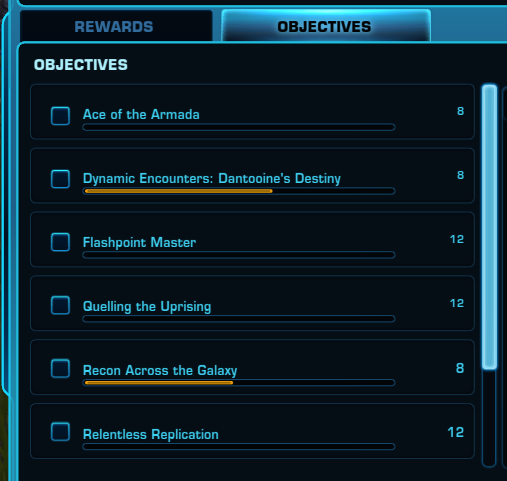
Step 2 – Complete Level 5 of Galactic Seasons
Once you have earned your 40 points, you will have completed Level 5 of Galactic Seasons!

Step 3 – Claim the PH4-LNX Protocal Lockbox from the track
Click the CLAIM button above the PH4-LNX Protocal Lockbox. This will put a set of items into your inventory.

This will put two items in to your inventory.

One will give you PH4-LNX immediately, and the other will send you on a short quest to meet PH4-LNX first. You can claim PH4-LNX now and still do the story quest later if you’d like.
To get PH4-LNX right away (recommended), right-click the G.A.M.E. Authorization Codes.
This will give you a pop up quest called Message from the G.A.M.E. Click Accept Mission below it.

Then in a few seconds PH4-LNX will suddenly be beside you! Yay! You can now go complete any objectives that require PH4-LNX.

How to Get PH4-LNX’s Story Quest
To see PH4-LNX’ story quest, either before or after you get her, right-click the “Worthy Employer” Unlock item.

There are no requirements for this quest except you will need your ship in the story, so you can fly to Nar Shadaa, in the Lower Promenade.

You can then have a little chat with PH4-LNX on Nar Shadaa about who she is and why she is joining you.

This quest sends you on a little jaunt around Nar Shaddaa and explains PH4-LNX’s background.

Companion Gifts
If you have earned PH4-LNX, you can go to the Galactic Seasons Vendor, and the vendor will have three gifts for sale specifically for PH4-LNX. The vendor is named Ki’at Thavo and is located in the Supplies section of the Republic or Imperial Fleet.
PH4-LNX on Other Characters
Once you have PH4-LNX out beside you, you can then easily unlock PH4-LNX across your entire account through Collections.
PH4-LNX is Missing
If you had PH4-LNX earlier, but she suddenly went missing, you may have accidentally picked up her Worthy Employer quest. She may be waiting for you on Nar Shaddaa, and you get her back after talking to her!

 Questions or comments? Feel free to send me a message on Twitter





 Discord
  Email swtorista@gmail.com
 Bluesky @swtorista.com
 Reddit /u/swtorista
 Twitch Swtorista
 Youtube
 Patreon
 Twitter @swtorista