The images on this page may appear broken until I swap them over. – Swtorista
How to Display Stronghold Labels
You can give each of your Strongholds a Title that you collect various ways (see table below). To do this, open the Strongholds Management Window on the Menu Bar.

Click the down arrow on the Stronghold you want to Title.

Click the down arrow next to “Title:”
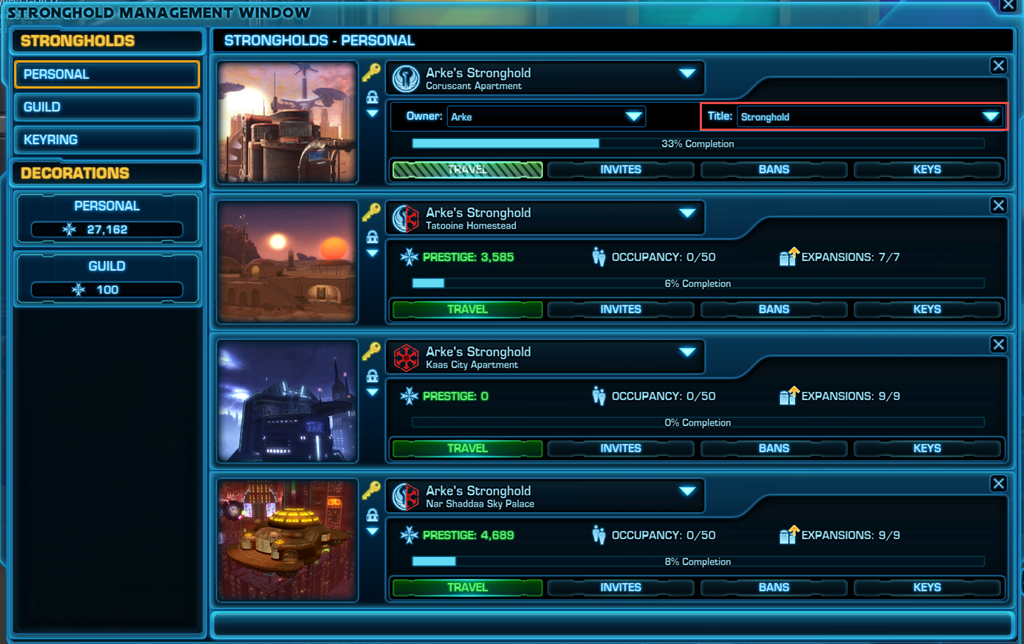
Choose the Title you wish for your Stronghold.

Your Stronghold will now display the new title in the Stronghold Management Window and in the Public Listings on Fleet.

Stronghold Title Sources
| Chamber of Deception |
Apprentice’s Shadow Pack
|
| Chamber of Truth |
Master’s Shadow Pack
|
| Galactic Stronghold |
Given free to subscribers and preferred players
|
| Imperial Sanctuary |
Starfighter & PvP Decoration Vendor (1000 Warzone Commendations)
|
| Jedi Academy |
Pub Light Side Vendor (10k credits – Light V)
|
| Lair of Shadows |
Acolyte’s Shadow Pack
|
| Marketplace Cantina |
Seneschal’s Stronghold Pack
|
| Pirate’s Roost |
Pilgrim’s Shadow Pack
|
| Republic Sanctuary |
Starfighter & PvP Decoration Vendor (1000 Warzone Commendations)
|
| Sith Academy |
Imp Dark Side Vendor (10K credits – Dark V)
|
| Smuggler’s Haven |
Constable’s Stronghold Pack
|
| Starfighter’s Lounge |
Starfighter & PvP Decoration Vendor (500 Fleet Commendations)
|
| Stronghold | |
| Temple of Darkness |
Pub Dark Side Vendor (10K credits – Dark V)
|
| Temple of Light |
Imp Light Side Vendor (10k credits – Light V)
|
| Trade Emporium |
Architect’s Stronghold Pack
|
| Vacation Retreat |
Gatekeeper’s Stronghold Pack
|